Dieses Plugin ermöglicht es, den Blog in einer anderen Sprache zu betreiben, als im Backend. Ihr könnt also z.B. den Blog in deutsch den Benutzern präsentieren und gleichzeitig Englisch innerhalb des Loginbereichs verwenden.
Es sind alle Sprachen auswählbar, die in WordPress installiert wurden. Fals also eine Sprache fehlt, kann diese auf der Website von WordPress runtergeladen werden und in das entprechende Verzeichnis installiert werden. Der Download-Link und das eigene Verzeichnis für die Sprachdateien werden in der Administrationsoberfläche des Plugins angezeigt.
Installation:
Installation über die WordPress Adminstrator-Seiten:
- Gehe zur Admin-Seite
Plugins -> Installieren - Suche nach
kau-boyund wähle das Plugin aus - Wähle die Aktion
Jetzt installieren - Klicke auf
Jetzt installieren - Aktiviere das Plugin über den
PluginsMenüpunkt in WordPress - Du musst eventuell die Einstellungen anpassen, vor Allem die Sprache für das Backend
Installation unter Verwendung der WordPress Adminstrator-Seiten:
- Lade die zip-Datei des Plugins herunter: kau-boys-backend-localization.1.6.zip
- Gehe zur Admin-Seite
Plugins -> Installieren - Wähle den Link
HochladenunterPlugins InstallierenÜberschrift - Wähle die zip-Datei aus und klicke
Jetzt installieren - Aktiviere das Plugin über den
PluginsMenüpunkt in WordPress - Du musst eventuell die Einstellungen anpassen, vor Allem die Sprache für das Backend
Installation unter Verwendung von FTP
- Lade die zip-Datei des Plugins herunter: kau-boys-backend-localization.1.6.zip
- Entpacke es und lade es in dein
/wp-content/plugins/Verzeichnis hoch - Aktiviere das Plugin über den
PluginsMenüpunkt in WordPress - Du musst eventuell die Einstellungen anpassen, vor Allem die Sprache für das Backend
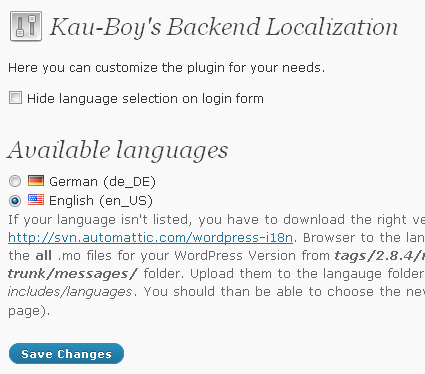
Screenshots:
Screenshot der Einstellungsseite
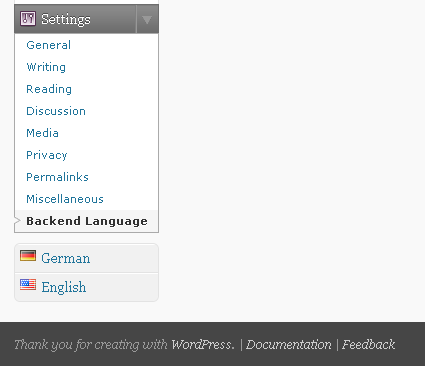
Screenshot der Sprachumschalters im Adminmenü (ähnlich zum qTranslate Umschalter)
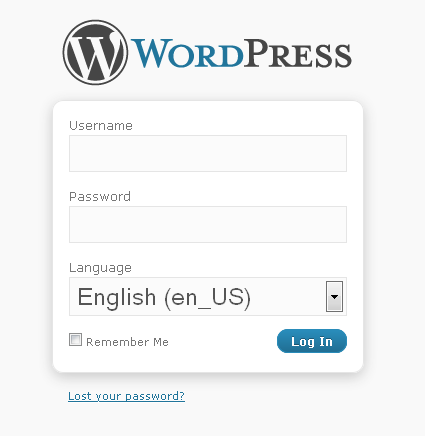
Screenshot der Sprachauswahl im Loginfomular
Versionsgeschichte:
- 1.6 Hinzufügen der WP3 CSS Klassen für das Anmeldeformular
- 1.5 Plugin für WordPress 3.0 MULTISITE Feature repariert
- 1.4 Plugins für WordPress MU repariert und die Login Sprachen Auswahl repariert
- 1.3 Anpassung des Plugins für die Verwendung mit PHP4. Danke an David für den Fix!
- 1.2.1 Ersetzen der do_action() Funktion mit der add_action() Funktion für admin_menu um Probleme mit anderen Plugins zu vermeiden
- 1.2 Hinzufügen von neuen unterstützten Sprachen
- 1.1 Entfernen von „short open tags“, die auf blogs die Fehler verursachen die „short_open_tag“ nicht auf „On“ gesetzt haben
- 1.0 Hinzufügen eines Sprachumschalters zum Adminmenu und einer Option zum verbergen der Sprachauswahl im Anmeldeformular
- 0.6 Speichern der Spacheinstellungen in einem Cookie um verschiedene Sprachen für mehrere Benutzer zu ermöglichen
- 0.5 Hinzufügen einer Sprachauswahl zur Anmelden Seite
- 0.4 Anzeige aller Sprachen, die im WordPress language Ordner gespeichert sind
- 0.3 Aktivieren der neuen Sprache nach dem Speichern (kein Neuladen mehr nötig)
- 0.2 Hinzufügen der deutschen Übersetzung für die Einstellungsseite
- 0.1 Erste stabile Version
Wenn dir dieses Plugin gefällt oder dir etwas fehlt, würde ich mich freuen es zu erfahren. Hinterlasse einfach ein Kommentar auf dieser Seiter oder auf meiner WordPress Plugin Seite.


Works great, thank you
Hi! Nice PlugIn (i guess) – can’t get it to work on a WordPress MU Blog. Don’t know whether it’s due to that, or if i did something wrong. The following thing happend, when i uploaded the .zip, which has automatically been extracted. The installation has been also successful, but i was unable to activate it. I got the following error:
( ! ) Parse error: syntax error, unexpected ‚}‘ in /path/to/wp/wp-content/plugins/kau-boys-backend-localization/backend_localization.php on line 167
Are there any hints you can give me?
Thanks for your error reposting. On my new local test environment I once had the same problem. But that it suddenly disappeared, so I thought it was because of a developing error on that local test blog. But now with your help I found the problem. In to lines I used <? in and not <?php to open a PHP block. This so called short open tag must be activated in PHP which isn't in most of the custom setting. I now replaced the two short open tags with the correct long form and added the new version 1.1 to the wordpress plugins. So please update the plugin through your blog backend.
Again many thanks for finding this error!
Hey Bernhard, thanks for the fast response due to the bug 😉
At least I have been able to activate your plugin. Now I can see the language switches on the login screen and in the backend. But they do not provide any functionality. Any changes I do are not applied. Only the ‚Blog language‘-option in the ‚Settings>Generals‘ tab seem to be able changing the language of the backend.
The only thing I did has been creating a directory ‚languages‘ in the ‚wp-content‘ dir and putting in the ‚de_DE.mo‘ language file and editing the ‚wp-config.php‘ line define (‚WPLANG‘, “); to define (‚WPLANG‘, ‚de_DE‘);. Further info: using WordPress MU 2.8.5.2 .
Thanks again for any help 😉
Plese go to the settings page of my plugin. Can you see any available languages on this page? In the description you will find the path to the folder, where you have to place to .mo files. On most blogs it should be inside the wp_content folder, but it might be in a diffrent one in WordPress MU. Yesterday I tried to install a WordPress MU on my local test environment, but I didn’t succeed. I wil try to do that this evening again to find out if there is a problem with Wordress MU.
Using my plugin you don’t have to chage the WPLANG in the config. also you shouldn’t change the WPLANG, as it changed both, the backend AND the frontend language.
may i help u to translate to Malay language..?
Yes that would be great. I don’t have a current .pot file in the plugins folder but you can just copy the German po file and use it for your translation.
Hey Bernhard,
I,ve installed your Plug-In and I,m using WordPress 2.8.6. Now I,ve a problem. WordPress shows me the different languages and if I choose one, nothing happen. The backend language is still the same. Could you please help me?
How did you tried to change the backend language? In some cases, the selection on the login screen doesn’t work, especially if it is affected by some other plugins. But you should be able to change the language with the switcher in the admin menu.
I,ve tried both ways, but it didn,t work. If I change the language in ‘wp-config.php’ (‘WPLANG’, ‘es_ES’); it works. I,m using WPML Multilingual CMS Plug-In for the frontend. May be it is because of WPML?
I like this plug-in but am wondering if you could create a PHP 4 compatable version due to the host I have?
scandir is causing me some issues. Thanks!
I resolved the issue. Some may not be necessary.
/* php 4 fix */ $dir = WP_LANG_DIR; $dh = opendir($dir); while (false !== ($filename = readdir($dh))) { $files[] = $filename; } /* read the array */ foreach($files as $file){ $fileParts = pathinfo($file); if(!isset($fileParts['filename']) && $fileParts['extension'] == 'mo' && (strlen($fileParts['filename']) <= 5)){ $fileParts['filename'] = substr($fileParts['basename'], 0,strpos($fileParts['basename'],'.')); $backend_locale_array[] = $fileParts['filename']; } }I’m using this plugin in WPMU installation and it works fine in all the blogs, expect for one. In this one blog, the language selected on the login page’s dropbox comes back once and again. For example, if pick EN when logging in and then I use the flags to change languages, every time I clik on a menu item, the language changes back to EN.
Any ideas of what the problem could be?
Thanks a lot!
Is this one blog also running on the WPMU system with all the other blogs? Which Version of WPMU do you use. I am going to get a setup like yours to reproduce the problem.
Yes, it’s on WPMU with the other blogs. I use WPMU 2.9.2
Thanks a lot for your help!
Hallo,
ich nutze das Plugin in einer Wpmu Installation.
Ich habe als Sprachze für das Backend Deutsch gewählt.
Allerdings ist noch immer alles in Englisch.
Woran könnte das liegen?
Grüße,
Lars
Hallo Lars,
das gleiche Problem hat auch Inaki angesprochen. Ich bin noch dabei rauszufinden woran es liegt. Nutzt du auch WPMU 2.9.2?
Gruß
Bernhard
Hi Bernhard,
ja ich nutze die aktuellste Version.
Grüße,
Lars
Ok, ich installiere mir dann jetzt gleich mal WPMU 2.9.2 und werde versuchen den Fehler so schnell wie möglich zu finden.
ja lässig, gib Bescheid, wenn du was genaueres weißt.
Bei den Plugins scheint es übrigens zu funktionieren sofern diese mehrsprachig sind.
[…] neue Version könnt ihr auf meinem Post zum Plugin sowie im Plugin Repository von wordpress.org runterladen. Wer es schon installiert hat kann es wie […]
@Inaki: The Plugin has been fixed for WordPress MU. Thanks for your comment.
@Lars: Danke auch für deinen Kommentar und ich hoffe es funktioniert jetzt bei dir.
Hi, I’ve tried the plugin with WordPress 3 MS. It changes the backend language without any problems but…but.. it prevents the frontend language from being changed. I’ve tried network activation, activation per site and activation only on the top domain but the result is always the same – the backend language changes but the frontend (regardless of WPLANG) remains in English (the plugin’s default backend language).
I might have misunderstood the plugins purpose, is it supposed to change the backend language and allow the frontend language to be whatever is set in WP-Lang?
The plugin should only change the backend language. Maybe there is an error in your wp-config.php. Have you tried to change the value of WPLANG to something diffrent and than deactivate my plugin. Does it work doing so?
The only request parameters that should trigger the language to change are „pwd“ and „kau-boys_backend_localization_language“ and the defined variable WP_ADMIN which should only be set in the backend.
Who does the WP_LANG value in your wp-config.php looks like? Do you use a multilingual theme with the correct language files installed. I would be glad if I can help you out.
Thank you for your quick reply.
WPLANG in confi.php is set toits default parameter:
define (‚WPLANG‘, “);
The only place I’ve set each sites language is via Sites>Edit>WPLANG.
Each site has a unique language setting which works fine when the plugin is disabled. As soon as the plugin is enabled the frontend shows up in English (the plugins default master language).
Ok, just give me some time to set up a test system with multisites enabled so I can test it myself.
Thank you, Bernhard.
After setting up my first WordPress mutlisite testing environment, I think I have found the error. It should now work with single and multisite installations. Just update to version 1.5 and test it again.
I will do as soon as the update propagates through WordPress.org. I will let you know the result either way.
Yes, that sometimes takes to long. On wordpress.org it was updated just 5 minutes ago. Let’s see how fast you’ll see it in your backend. Maybe loggin off and on again will make the update appear.
Thought better of it, I’ve just downloaded it from your server, installed then activated. It works fine. Bernhard, thank you.
That’s great, I am glad I could helped. And many thanks to you for pointing out that error so other users will also benefit from the changes!
Hi, Love your plugin. I found there is a small problem in the admin panel button function, at least for my blog. You use ‚http://‘ at the beginning of $link. It came out like “ http://wp-admin/…“, of course page not found.
I made a small change of the script, using home_url() to replace ‚http://‘, and it comes perfect.
Don’t know if anyone else has the problem. Just let you know this potential bug.
Regards, Justin
Großartiges Plugin. Funktioniert bei mir ohne Problem und hilft mir gerade echt bei einem norwegischen Projekt. Danke!
Eine Idee habe ich noch: Anstatt immer beim Login die Sprache auszuwählen könnte man die Sprachwahl zusätzlich, oder alternativ, auch im Profil hinterlegen. Wenn sowieso klar ist, dass der User eine bestimmte Sprache benutzen will/muss wäre das ein bisschen eleganter als die Auswahlbox.
Hallo Torsten, erst einmal toll, dass es dir weiterhilft. Deine Idee ist im Grunde nicht schlecht. Bei einem Blog mit nur einem Nutzer könnte man die Auswahl bei der Anmeldung wirklich weglassen. Aber ich habe auch an Szenarien gedacht, wo mehrere Nutzer das Backend in verschiedenen Sprachen nutzen möchten. In diesen Fällen weiß ich ja dann vor der Anmeldung nicht, welcher Benutzer sich gerade anmeldet.
Da ich die zuletzt gewählte Sprache in einem Cookie speichere sollte aber immer die richtige Sprache gleich ausgewählt sein. Alternativ nimmt er die Sprache, die im Backend als Option für alle Nutzer eingestellt ist.
Ich könnte mir aber folgende Änderung vorstellen. Mit aufsteigender Priorität:
1. Sprache in der wp-config
2. Sprache in den WordPress Option
3. Sprache in den Option eines Nutzers
4. Sprache im Cookie eines Nutzers
5. Sprache im Request (beim Klick auf den Umschalter im Backend-Menü)
Im Moment habe ich die Optionen 1, 2, 4 und 5 umgesetzt. Ich könnte also das ganze dahingehen erweitern, dass es auch für Nutzer ohne Admin-Rechte ein Optionsmenü für die Sprachauswahl gibt.
Für deine Anforderung gibt es aber eine recht einfache Lösung: Du kannst als Admin die Auswahlbox im Anmeldeformular in der Plugin-Optionen ausblenden lassen. In diesem Fall wird Option 2 gewählt, wenn der Nutzer noch keinen Cookie gesetzt hat (also z.B. auch an einem neuen Rechner) oder aber es wird die letzte von ihm verwendete Sprache eingestellt.
Ich denke das ist für die meisten Nutzer meines Plugins ausreichend, aber ich greife deine Idee sehr gerne auf und werde sie demnächst mal umsetzen. Ich bin mir nur noch nicht ganz sicher, wann genau ich z.B. den User-Wert überschreiben soll. Im Grunde müsste das dann bei jedem Wechsel der Sprache passieren, ganz gleich wie dieser ausgelöst wurde.
Hallo,
Wenn ich die Deutsche Sprache auswähle (beim neuen update) und es dann Speicher, komm ich auf ne Weiße Seite und nichts ist passiert.
Bitte um Hilfe, danke.
Welche Version des Plugins und welche WordPress Version setzt du denn ein? Ich habe es gerade noch einmal mit den aktuellsten Versionen getestet und kann den Fehler nicht reproduzieren.
Kannst du die Sprache über die „Buttons“ in der Sidebar deines Backend umstellen?
Plugin: 2.0.2
WP:3.4.2
Enlisch geht nur Deutsch ladet er die Seite nicht weiter, ich hab nur Die Deutsche Flagge & Englische Flagge links unten
hat sich bis jetzt nichts getan auch bei Pugins deaktivierungen.
hm 🙁
Alexander ich habe es mehrfach mit der aktuellen WordPress Version und dem aktuellen Plugin getestet. Ich kann den Fehler leider nicht reproduzieren. Es könnte durchaus sein, dass es sich mit einem anderen Plugin stört. Könntest du mir mal eine Auflistung der Plugins geben, die bei dir aktiv sind?
Funktioniert das Umschalten denn über die Einstellungsseite? Funktioniert es von einer Unterseite des Backends aus, also nicht vom Dashboard?
Also Funktionieren tut es via Dashboard. Und das einzige ist eben nur das es bei Englisch ohne Probleme klappt nur wie gesagt in Deutsch ladet er mein Admin-Dashboard weiß.
Plugin/List
(Aktiv)
404 Redirection
App Store Assistant
Contact Form 7
GetSozial
Multicons
PC Robots.txt
SEO Smart Links
Simple WP Retina
WPTouch Pro (Gekauft)
Sie können mir auch gerne (wenn möglich) per Email schreiben.
Danke
Wenn die Seite weiß bleibt, mal WP_DEBUG in der wp_config.php auf true stellen, damit Du siehst, welcher Fehler das verursacht. Bei Sprachdateien ist oft der Speicher nicht ausreichend.
Danke Torsten für den Hinweis. Damit bekommt man der Fehler vermutlich schon gelöst, aber auf einer Live-Website ist das nicht immer möglich. Mittlerweile haben wir aber auch per E-Mail ein bisschen weiter kommuniziert und es lag wohl am 404 Redirection Plugin. Nach dessen Deaktivierung klappt es.
Hallo Bernhard,
mir ist ein kleiner „Fehler“ in dem Plugin aufgefallen: In einer Multisite-Umgebung ist die Adminbar im Adminbereich übersetzt, aber im Frontend noch in der Originalsprache des Blogs. Feature oder Bug? 😉
Feature 😉 Oder besser gesagt: Es wird wohl nicht anders funktionieren. Die Adminbar ist ja im Frontend eben ein Teil des selbigen. Und da das Frontend nur eine einzige Sprache haben kann, ist es wohl nicht möglich einen Teil davon anders zu übersetzen. Die einzige Mögliche Lösung wäre die Übersetzung des gesamten Frontends für einen eingeloggten Nutzer. Das kann aber auch zu sehr unschönen Nebeneffekten führen, wenn z.B. die Sprache ltr aber das Theme rtl ist. Ich werde es also so lassen, wenn das für dich OK ist 😉 Denkbar wäre noch eine Option, mit der man explizit sagen kann, dass auch das Frontend die eingestellte Sprache annehmen soll. Das könnte ich noch einbauen. Eventuell sogar mit kleinen Flaggen in der Adminbar.
Ich dachte mir schon, dass es wohl ein technisches Problem gibt. Wenn man die Adminbar im Frontend nicht gesondert ansprechen kann, dann passt das für mich 🙂 Wollte dich nur informieren…
Könntest Du ja der FAQ hinzufügen, als „Known Issue“ oder so.
Vielen Dank auf jeden Fall für den Hinweis. Ich werde vielleicht wirklich das Feature einbauen, dass man auch im Frontend die Sprache wechseln kann. Das ist eigentlich nicht schwer zu implementieren, gibt dem Plugin aber eine ganz neue Dimension 😉
Nichts Wildes, aber im Backend bekomme ich eine PHP-Notice:
Beste Grüße nach Berlin
funktioniert das auch in der aktuellen WP Version?
Ja, das funktioniert auch mit der aktuellen Version. Habe es selbst in meinem Blog im Einsatz und nach dem Update auf 4.1 getestet.
ok. danke.
Hallo ich möchte auf einer Seite, die komplett englisch ist das Backend in deutsch betreiben. Stelle ich mittels des Plugins die Backend-Sprache auf deutsch, bekomme ich Widgets auf der Live-Seite auch plötzlich auf deutsch angezeigt. So ist es für mich leider nutzlos..
Hi. Also bisher habe ich einen solchen Fall noch nicht,beobachten können. Ist denn wirklich das Frontend des Blogs im deutsch oder geht es nur um bestimmte Widgets? Kannst du mir vielleicht ein paar genauere Details zu deiner Seite und den Widgets geben und wo genau was in deutsch angezeigt wird?
Ändere ich die Sprache des Plugins, ändert sich auch die Einstellung „Site Language“.
Versuche ich die Sprache direkt auf der Seite wp-admin/options-general.php einzustellen lässt sich die Sprache NICHT umstellen, nur über das Plugin (also per Fahne im Admin-Menu). Die betroffenen Plugins sind „Awesome Weather Widget“ und „WP Twitter Feeds“ (aus h wird Stunden)
OK danke für die Hinweise. Ich schaue mir das mal an. Vielleicht gibt es ja wirklich mit der neuen Version einen Fehler, der bisher noch nicht aufgefallen ist.
Danke Dir auch, würde mich freuen wenn es läuft und wenn ich dazu beitragen kann.
Meldest Du Dich bitte wenn es Erkenntnisse gibt? Danke!
Noch eine andere Kleinigkeit für zwischendurch:
Der Text auf
https://wordpress.org/plugins/kau-boys-backend-localization/
ist am Ende abgeschnitten:
„So you can serve your blog using e.g. German as the de…“