Viele nutzen Autovervollständigungen auf ihrer Website. Es ist nicht nur eine sehr beeindruckende Technik, sondern zudem eine sehr nutzerfreundliche. Zusätzlich kann sie dazu dienen, dass in einem Formular möglichst gültige Werte gespeichert werden. Selbstverständlich müssen alle Daten serverseitig erneut überprüft werden.
Ich möchte heute zeigen, wie einfach es mit Scriptaculous möglich ist, eine Autovervollständigung mit Google-Maps-Adressen umzusetzen. Da man per AJAX nicht auf fremde Website einen AJAX-Request durchführen kann, müssen wir ein Skript als Schnittstelle zwischen Google Maps und unserer Website verwenden. Fangen wir also dieses Mal mit der serverseitigen Script an:
$json = json_decode(file_get_contents('http://maps.google.com/maps/geo?output=json&oe=utf8&sensor=false&hl=de&key=DEIN_GOOGLE_MAPS_API_KEY&q='.urlencode($_REQUEST['address'])));

echo '<ul>';
if(!empty($json->Placemark)){
	foreach($json->Placemark as $value){
		echo '<li>'.$value->address.'</li>';
	}
}
echo '</ul>';
Zuerst stellen wir eine Suchanfrage an Google Maps, wobei wir den zu suchenden Text einfach im Parameter „q“ übergeben. Der Parameter „output“ gibt hierbei das von Google Maps zurückgelieferte Format an. Ich habe hier JSON verwendet und wandle die Daten anschließend mit der json_decode() Funktion in ein Objekt um. Es kann aber genauso gut XML in Kombination mit einer XML Funktion sie simplexml_load_string() verwendet werden. Da JSON da kompaktere Format ist habe ich mich in diesem Beispiel dafür entschieden.
Ein weiterer interessanter Parameter ist „hl“, der die Sprache der Adressen angibt. Viele werden den Parameter auch von der Google Suche kenne. Hier werden die Adressen also in deutsch zurückgegeben. Mit Hilfe dieses einen Parameters könnt ihr also sehr schnell die Funktion auf andere Spracheversionen eurer Seite anpassen.
Damit ihr überhaupt eine Anfrage an Google Maps stellen dürft, benötigt ihr einen kostenlosen Google Maps API Key, den ihr an den „key“ Parameter anhängen müsst (Danke an paddy, der mich auf das Fehlen des Keys hingewiesen hat).
Nachdem die Daten von Google Maps empfangen wurden und im Objekt vorhanden sind, geben wir sie an die JavaScript Funktion zurück. Dazu erzeugen wir einfach eine unsortierte Liste mit einem Eintrag pro gefundener Adresse.
Und jetzt kommen wir zum sehr umfangreichen clientseitigen Script. Dazu müssen wir erst einmal ein Formular mit einem Textfeld erzeugen. Außerdem benötigen wir ein DIV, in dem die Ergebnisse ausgegeben werden. Zu guter Letzt kommt dann noch das JavaScript, das den ganzen AJAX-Request und das Behandeln der Empfangenen Daten erledingen muss. Was aber sehr kompliziert klingt, ist recht kurz umgesetzt:
<input type="text" id="address" name="address" />
<div id="adresse_choices" class="autocomplete"></div>
<script type="text/javascript">
	new Ajax.Autocompleter('address', 'adresse_choices', 'get_addresses.php');
</script>
Die ganze Sache lässt sich mit einer einzigen Zeile JavaScript erledigen. Selbstverständlich müssen dazu noch im Kopfbereich die „prototype.js“ sowie anschließend die „scriptaculous.js“ eingebunden werden. Die Funktion Ajax.Autocompleter() gehört hierbei zum Funktionsumfang von Scriptaculous. Das fertige Resultat sieht dann wie folgt aus:
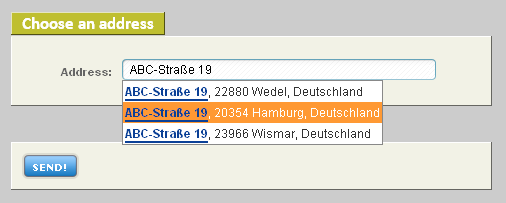
Die hier verwendete ABC-Straße ist kein Witz, sondern die Adresse von Google Deutschland. Eine weitere schöne Eigenschaft von Google Maps ist die automatische Rechtschreibkorrektur, die bei fehlehaften Eingaben durchgeführt wird. Selbst eine Eingabe wie „plazt der luftblöcke“ führt trotzdem zu dem gewünschten Platz vor dem ehemaligen Berliner Flughafen. Um die Sache testen zu können, habe ich hier ein kleines Beipsiel erstellt, dass ihr euch auch gerne im Quellcode runterladen könnt. Ich habe zusätzlich noch eine Funktion verwendet, die den Suchbegriff hervorhebt:
Wir ihr also sehen könnt, ist es mit der Ajax.Autocompleter() Funktion und einem servreseitigen Skript sehr einfach möglich, auch Daten von anderen Seiten auszuliefern. Das dazu benötigte PHP Skript kann durch kleine Veränderungen an die entsprechende extrene Datenquelle und das zurückgelieferte Format angepasst werden. Die Funktion lässt sich aber natürlich auch genauso gut mit jQuery oder einem anderen Framework umsetzen. Dazu muss dann aber eventuell das zurückgelieferte Format des PHP Skript auch noch angepasst werden.
Ich hoffe das Beispiel hat euch gezeigt, wie vielfältig sich eine Autovervollständigung einsetzen lässt. Habt ihr auch schon einmal mit externen Daten gearbeitet? Oder habt ihr vielleicht eine Idee, konntet sie aber bisher nicht umsetzen? Über ein Kommentar dazu würde ich mich sehr freuen.
it doesnt work :-(, the demo is not working?
Hi Paddy,
thanks for your comment. I have forgotten to add the Google Maps API Key to the example code. I have now added the key to the post content and to the example and example source code download.
Bernhard
the code works really well :). Can we make this code reverse?? i mean like first the user enters the country then we autocomplete city for him after that we autocomplete a place for him in the city.??
[…] Um die Ajax.Autocompleter Funktion nutzen zu können benötigt jedes Feld eine eindeutige ID. Nehmen wir also an, wir haben folgendes erstes Feld für unser Formular (hier ein Beispiel aus dem Artikel: Google Maps Suggest – Adress-Autovervollständigung mit Scriptaculous): […]
Hi,
Nice script.
Is there a possibilty to only show the result of the countries: Netherlands and Belgium?
Thanks.
Hi Steffan,
that should be no problem. I you just query the data from Google and than filter the results by the „CountryNameCode“ or „CountryName“ field from the XML or JSON against the two countries. Depending on the language you use (the „hl“ parameter) you have to use the correct spelling of the country name.
I hope that gave you an idea on how to solve the problem. If you still have some question, don’t hestitate to leave another comment.
Hey!
Can you please explain exactly how it works? Maybe with an Code sniplet? I don’t get it on my own 🙁
I think I’ll write another post about that topic. But something like this should do the trick (untested):
echo '<ul>'; if(!empty($json->Placemark)){ foreach($json->Placemark as $value){ if(in_array($value->AddressDetails->Country->CountryName, array('Netherlands', 'Belgium'))){ echo '<li>'.$value->address.'</li>'; } } } echo '</ul>';Thank you very much! It works well.
I wanna quote your first comment.
„Depending on the language you use (the “hl” parameter) you have to use the correct spelling of the country name.“
For example ‚array(‚Deutschland‘)‘
Greetings
hey
ich komm mit den vielen skript nicht klar.
ist es möglich nur ergebnis von deutschland auszugeben und 3 felder inputs dafür: Stadt, Strasse , plz . strasse sollte plz automatisch vervollständigen..hilfe
Soweit ich das richtig verstehe möchtest du drei Eingabefelder anbeiten. Zuerst eines für die Stadt und anschließend eines für die Straße sowie für die PLZ. Der Benutzer füllt also zuerst das Feld Stadt aus und dann das Feld Straße. Wenn er dann auf Straße klickt soll das Feld PLZ automatisch gefüllt werden. Ist das soweit korrekt?
Falls ja hier der Lösungsansatz. Für das Feld Straße nimmst du den Inhalt des Feldes und hängst den Text „, Deutschland“ an. Das schickst du dann über die API an Google Maps. Wenn der Benutzer also z.B: „München“ eingetippt hat, dann ergänzt du es zu „München, Deutschland“.
Für die Straße sieht es dann ähnlich aus, wobei du hier die Werte für „Stadt“ und „Straße“ per AJAX an dein PHP-Skript übermittelst und diese Anschließend mit „Deutschland“ zu einem Text verbindest. Wenn der Benutzer also z.B: „Maximilianstraße“ angibt, verbindest du alle Parameter zu dem Text „Maximilianstraße, München, Deutschland“. Von der Google Maps API solltest du dann eine komplette Adresse inkl. PLZ bekommen, aus der du dann die PLZ auslesen und in das Feld PLZ per JavaScript einfügen kannst.
Ich hoffe du hast ungefähr eine Ahnung, was ich meine und wie das Ganze gemacht werden kann. Vielleicht erstelle ich mal einen neuen Artikel zu dem Thema.
Thanks.
This is just the script i was looking for.
One question though: isn’t there a limit on the number of request per day? 2500 per 24hours per IPaddres, I think.
This starts to count when request are made trought this ‚proxy‘ script (get_addresses.php).
Or isn’t that for these type of requests?
There is nedeed a limit of 2,500 request pre day and IP as described here: http://code.google.com/apis/maps/faq.html#geocoder_limit. But as you cannot use the clients IP because of the same origin policy, you can’t avoid that. However, there are ways to do more request. You may buy a Google Maps API Premier account or you use different API that might offer more requests.
Another way to cope with the limit is to cache request on your server in a database. Just use the form input string a the primary key and store the recieved XML string (or the serialized SimpleXML/JSON object) in the database. You can than query your DB first and afterwards the Google Maps API. That might also result in quicker responses as a query to your DB might be faster than a file_get_contents() to the Google Maps API.
[…] Google Maps Suggest – Adress-Autovervollständigung mit Scriptaculous […]
Thanks for the tutorial, which is exactly what i am looking for. I have learned a few important lessons. THANKS!
Geile Sache, werde ich mal für einen Magento Shop Checkout versuchen und passt sogar, dass Magento auf Prototype und Scriptaculous basiert.
Hallo,
super Code danke!
Eine Frage, wie kann ich idealer Weise im HTML-Bereich z.B. als Input-Feld jeweils Strasse, PLZ, Ort der „Ergebnis-XML“ ausgeben?
Möchte gerne dass der User nur in einem Suchfeld sucht und die gewählten Daten dann auf die Inputfelder verteilt werden. DANKE !!!!
Wenn ich dich richtig verstanden habe, möchtest du die zurückgegebene Datei aufdröseln und auf Input-Felder verteilen. Du kannst innerhalb json wie folgt navigieren $json->Placemark->AddressDetails->Country->CountryName->address ?! Ist es das was du meinst? Wie die Struktur genau aussieht kannst du z.B: hier nachlesen.
http://code.google.com/intl/de-DE/apis/maps/documentation/geocoding/v2/
Ich hoffe das hilft dir weiter!
Und danke noch mal an dieser Stelle, funktioniert immer noch gut auf meiner Seite 😉
@Parcello
Suuuuuper vielen Dank
Irgendwie bin ich zu blöd eine Variable zu setzen.
Wie würde der Teil in der PHP aussehen? Danke 🙂
Im Grunde ja. Aber das Problem ist etwas komplexer. Er muss ja auch die einzelnen Teile der Adresse an den Browser übermitteln, um sie dann dort in die Felder einzufügen. Ich habe das ganze eben mal schnell gecodet. Wenn ich es schaffe, dann gibt es noch heute Abend einen Artikel dazu. Die fertige Lösung kann hier angesehen werden:
Beispiel Download
Wow ! Grosse Klasse vielen vielen Dank !!! Funktioniert danke danke danke
Eine Frage noch, gibt es von google eine Api, welche auch noch zulässt, nach Unternehmen zu suchen?
Bsp. Gebe ich ein Unternehmen und Ort in google maps bekomme ich den kompletten Adressdatensatz des Unternehmens 🙂 danke
Die Unternehmenssuche nennt sich Google Places. Dazu gibt es auch eine API: http://code.google.com/intl/de-DE/apis/maps/documentation/places/
Ich habe sie aber selbst noch nie genutzt, kann dir also nicht genau sagen, wie man sie für eine solche Suche ansprechen muss. Sie liefert aber auch XML mit den Treffern zurück, allerdings in einem ganz anderen Format. Ich denke aber, wenn du meine Beispiele vestanden hast, dann sollte eine Anpassung auf das XML Format kein Problem darstellen.
Wenn du dazu eine fertige Lösung programmiert hast würden wir uns natürlich auch freuen, wenn du sie mit uns teilst. Du darfst sie auch gerne als Gastautor hier vorstellen 😉
Mache ich sehr gerne, werde mich damit beschäftigen
Habe es heute erfolglos versucht 🙁
Wie ich das sehe, kann man mit Längen- und Breitengeraden und einer Kategorie z.B Restaurant Ergebnisse erzielen.
Mein Ansat analog google maps im Original: schreinerei mustermann hamburg und die Rückgabe der Daten inkl. Telefon bekomme ich nicht him.
Gruss
Hast du es schonmal geschafft zumindest eine Rückgabe zu erreichen? Ich bekomme mit den Beispielen immer ein REQUEST_DENIED zurück, obwohl ich einen gültigen API Kex verwende.
OK, man benötigt anscheinend einen speziellen Key dafür. Näheres dazu findest du hier: http://code.google.com/intl/de-DE/apis/maps/documentation/places/#Requirements
Hier mal ein Beispiel für eine Anfrage (funktioniert aber nur im Browser, nicht per PHP): BEISPIEL ANFRAGE
Im Grunde würde ich eine Suche so gestalten: Per Google Maps API nach den Koordinaten einer Adresse suchen und diese dann an die Google Places API für die Suche weitergeben.
Hallo,
klasse Sache!
Ich habe zwei Fragen.
Darf man auch von einer komerziellen Webseite aus oder wenn ich eine komerzielle Softwareauf diese Googlefunktion zugreifen?
Viele Grüße
Horst
Soweit ich das aus den AGB rauslese ja. Man darf aber nur eine bestimmte Anzahl Requests pro Tag machen (glaube es sind zur Zeit 25.000 pro Tag). Sollte die eigene Website zu groß sein, kann man eine Lizenz für Google Maps API Premier erwerben.
Vielen vielen Dank für diese Arbeit !
Freundliche Grüsse, Uwe
Super Skript!
Ich habe nur ein kleines Problem, und zwar will ich Flughäfen suchen lassen. Bei „Flughafen Düsseldorf“ funktioniert es einwandfrei, aber z.B. den Flughafen Münster/Osnabrück findet er nicht. Bei Eingabe von „FMO“ bekomme ich das Ergebnis davon, aber wenn ich dann wieder genau dieses Ergebnis (Flughafen Münster/Osnabrück (FMO), 48268 Greven, Deutschland) eingebe, wird nichts gefunden. Das hat bestimmt nichts mit deinem Skript zu tun, aber hast du vielleicht eine Idee, wie man das lösen könnte?
Viele Grüße von Steffi
Hallo Steffi,
das hat tatsächlich nichts mit meinem Skript zu tun. Mein Skript ist ja nur eine Schnittstelle zu den Ergebnissen von Google Maps und ich habe leider keinen Einfluss darauf, was Google liefert. Im Allgemeinen kann man aber sagen, dass es nur Straßennamen kennt, aber keine Gebäude, Einrichtungen, Institutionen oder Firmen an diesen Adressen. Eine Suche nach einem Flughafennamen wird also nicht immer funktionieren.
Ich habe noch mal ein bisschen rumprobiert, und es scheint ein Problem zu geben, wenn im Suchstring ein „/“ vorkommt. Ich kriegs nur irgendwie nicht hin, den Character richtig zu escapen. Weißt du, wie das geht?
Außerdem hab ich die zweite Version deines Skriptes laufen, und dort zeigt er nur das erste Suchergebnis. Ich habe dort noch ein
foreach ($markers_dom->getElementsByTagName(‚Placemark‘) as $oneplacemark) {
eingefügt und schaue dann auf die jeweilige Nummer der items.
Echt tolle Arbeit hier! Vielen Dank!
Ich frage mich gerade, ob es möglich ist, die auto-fulfill Funktion und die Aufteilung in die Adressbestandteile (zip, etc.) mit dem Google Routenplaner zu kombinieren. Das heißt das ich eine Start- und Zielpunkteingabe mit auto-fulfill (wie bei Google Maps Original)auf meiner Website habe und die eingegebenen Start- und Zielpunkte intern (z.B. für eine Datenbankabfrage) weiterverwenden kann.
Über eine kurze Einschätzung würde ich mich sehr freuen und mich anschließen sofort an die arbeit begeben. 🙂
VG Champs
Hallo Champs,
so ganz weiß ich nicht wie genau deine Lösung aussehen soll. Aber folgendes wäre sehr einfach möglich:
– Du hast zwei Eingabefelder, die jeweils eine Auto-Fill-Funktion haben, eines für die Start- und eines für die Zieladresse
– Der Benutzer gibt beide Adressen ein und bekommt dann z.B. über die Google Maps API eine Routenplanung präsentiert (oder wird alternativ auf die Google Maps Seite mit einer entsprechenden Routenplanung weitergeleitet)
Die Routenplanung kann sehr einfach mir der JavaScript API von Google Maps umgesetzt werden. Ein einfaches Beispiel findest du hier: https://google-developers.appspot.com/maps/documentation/javascript/v2/examples/directions-simple
Das Beispiel der API V3 ist nicht so toll. Aber es funktioniert im Grunde ähnlich. Hier ist eben ein Drop-Down anstelle der beiden Input Felder: https://google-developers.appspot.com/maps/documentation/javascript/examples/directions-simple
Die Ausgabe der Route als Anweisungen sollte hier auch möglich sein.
Ich hoffe, dass hilft dir weiter. Wenn nicht, kannst du mir gerne noch einmal eine konkretere Frage stellen.
Bernhard
Hallo zusammen, ich komme nicht Klar, mit diese ganze Goohle APIs, da sind viele apis, die man an und aus machen kann, und zusätzlich wenn mann einfach unter “ Simple API Access “ Create New Browser Key drauf klickt, und www.bspdomain.de eingibt bekomm eine Key, zBsp. AIzaSyAcXeRFN3o3vSl0TlNLzD3uXnGbLIiKkJc
das kommt in get_addresses.php mit &q am ende. ( Obwohl ich auch ohne versucht habe. )
$json = json_decode(file_get_contents('http://maps.google.com/maps/geo?output=json&oe=utf8&sensor=false&hl=de&key=AIzaSyAcXeRFN3o3vSl0TlNLzD3uXnGbLIiKkJc&q='.urlencode($_REQUEST['address'])));aber das Funktioniert überhaupt nicht.
Ich brauche dringend Bitte eure Hilfe !
Vielen Dank…
Vedat
Hallo Vedat,
ich habe gerade mal deine URL getestet und ich bekomme eine korrekte Rückgabe. Hier mal eine Beispiel-URL: http://maps.google.com/maps/geo?output=json&oe=utf8&sensor=false&hl=de&key=AIzaSyAcXeRFN3o3vSl0TlNLzD3uXnGbLIiKkJc&q=Berlin
Zwei Dinge können aber noch zu einem Problem führen. Zum einen der Aufruf von einer externen URL in der Funktion file_get_contents() und zum anderen das Fehlen des JSON Pakets in deiner PHP Installation.
Lass dir mal die Ausgabe der PHP-Funktion phpinfo() ausgeben. Dort sollte der Wert (Locale Value) von „allow_url_fopen“ auf „On“ stehen. Zusätzlich solltest du einen Abschnitt „json“ mit der Angabe „json support“ auf „enabled“ finden. Sollte eines davon nicht zutreffen, wird auch der Aufruf der URL nicht funktionieren.
Ich hoffe, dass dir das schon einmal weiterhelfen konnte. Falls nicht teile mir doch bitte mal mit, ob „allow_url_fopen“ und „json“ bei dir korrekt konfiguriert sind.
Hallo Bernhard,
Vielen Dank dass du für mich Zeit und Mühe gegeben hast, und geholfen hast. Das war große Hilfe für mich.
Genau das war mein Problem:
Ausgabe der PHP-Funktion phpinfo() ausgeben. Dort sollte der Wert (Locale Value) von “allow_url_fopen” auf “On” stehen.
“allow_url_fopen” war auf “Off”
Vielen Dank nochmal !
Sehr gerne! Ich werde demnächst wohl den Artikel auch nochmal mit Verwendung von jQuery schreiben, wobei sich da ja auf PHP-Seite nicht viel ändert.
Aber mit der Google Maps API v3 gibt es nun auch nativ eine Autovervollständigung. Die werde ich mir in den nächsten Tagen mal intensiver ansehen. Dann läuft das nämlich vermutlich alles direkt im Browser ohne, dass ein PHP-Skript benötigt wird.
Hallo Bernhard. Ich brauche nochmal deine Hilfe !
Deine Beispiele funktionieren nicht mehr, ich weiß nicht warum, Vielleicht hast du eine Antwort für uns.
Du wolltest auch verbessern für Google Maps API v3, aber ist immer noch nicht da.
Vielen Dank für Alles !..
Hallo Vedat,
leider hat Google die Maps API v2, die ich in dem Beispiel verwendet habe, zum 08.03.2013 eingestellt. Ich werde mich heute Abend gleich mal dran setzen und den Quellcode auf die neue API v3 aktualisieren.
Vielen Dank Bernhard, ich warte einfach ab.
Hey Bernhard,
ich möchte eine Autocompletion-Funktion für die Adresseingabe in meinem CRM realisieren.
Das Ausfüllen der Adressfelder soll wie bei einem Navi funktionieren.
Zuerst möchte ich die PLZ in einem Feld eingeben, danach soll im Feld für den Ort der bzw. die Ort(e) aufgelistet werden die zur PLZ passen. Wenn ich danach ins Feld für den Straßenname springe sollen die Straßen des Ortes auftauchen.
Gibt das die Google-API her?? Würde mich über ein paar Codesnipsel sehr freuen..
Hallo Ronny,
ich denke, dass die Google Maps API das leider nicht leisten kann. Ich habe bisher noch keine Möglichkeit gefunden zu einer gegebenen Postleitzahlen alle Orte ausgeben zu lassen. Ich denke auch nicht, dass Google so etwas anbieten wird.
Es gibt aber genau zu diesem Zweck viele andere Onlinedienste. Ich kann dir aber keinen davon nennen, da ich mich bisher noch nicht damit beschäftigt habe.
Die Demo funktioniert in meinem Firefox nicht. Muss ich irgendetwas ‚freigeben‘ o.ä. ?
Offenbar hat niemand sonst Probleme, weshalb ich einen Bug bei mir vermute.
Doch, das Problem haben auch andere (siehe 5 Kommentare weiter oben von Vedat). Es wird heute Abend von mir korrigiert. Ich hoffe, du kannst dich bis dahin noch etwas gedulden.
OK, ich habe das Beispiel und den Download dazu mal schnell auf die API v3 aktualisiert. Eine detaillierte Erklärung dazu folgt dann bald. Ich werde wohl ohnehin bald diesen Artikel noch einmal für jQuery schreiben, da ja Prototype nicht wirklich tot ist, aber jQuery wird einfach viel mehr genutzt.
Hallo Bernhard !.. Es tut mir leid für die 5 Kommentare, aber die haben unterschiedlichen Datum.
Die sind nicht alle neu. Aber ich Bitte um deine Verzeihung, wenn ich genervt habe.
Vielen Dank für deine Arbeit, Mühe, Zeit und Geduld.
Hallo Bernhard !..
Das funktioniert nicht bei Strato – PowerWeb Basic. Ich Bitte um dein Hilfe, Wenn du mal Bitte Zeit hast. Bei vedy.de siehst du mein phpinfo() und bei vedy.de/maps.html siehst du deine script.
Vielen Dank.
Seit dem 08.03.2013 ist die Google Maps API v2 nicht mehr verfügbar. Ich habe den Text noch nicht überarbeitet, aber über den Download-Button findest du die auf Google Maps API v3 angepasste Version. Versuche es mal mit dieser, die funktioniert bei mir bisher auf allen Servern, auf denen ich eine solche Funktion einsetze.
Ich weiß nicht warum aber das geht bei mir nicht mehr. Ich kann meine Zugangsdaten von mein FTP Schicken,
wenn du eine e-mail geben kannst. Sonst weiss ich nicht woran das liegt, weil das bei 1und1 funktioniert, bei Strato nicht.
Es gibt mittlerweile auch eine Lösung direkt von Google über die Places API. Ein Beispiel dazu findest du hier: https://developers.google.com/maps/documentation/javascript/examples/places-autocomplete?hl=de
Lieber Bernhard, ich weis das ich dich die ganze Zeit nerve :-), ich hoffe verzeihst du für Alles.
Ich habe nur eine Frage Bitte.
Kann man das nur mit Deutschland begrenzen, dass man nur von Deutschland Adressen bekommt,
Ohne vereinigte Städte oder Marokko, Türkei usw. ?
Viele Grüße…
Hi Vedat,
es ist schon OK, wenn du mir Fragen stellst. Aber Antworten auf solche Fragen findest du am besten in der offiziellen Dokumentation. Darin findest du auch die Lösung auf deine Frage, die seit der API v3 sehr einfach mit den RegionCodes möglich ist: https://developers.google.com/maps/documentation/geocoding/?hl=de#RegionCodes
Ist ja alles ganz nett das Script, aber mit ein bisschen jQuery und der API 3 geht es viel einfacher, auf Wunsch wird sogar noch der Plan angezeigt.
Hey Rene,
danke für deine Antwort. Wie du vielleicht gemerkt hast, ist der Artikel schon etwas älter. Zu diesem Zeitpunkt gab es die API 3 noch nicht und somit auch noch nicht die Autocomplete Funktion.
Es ist damit natürlich auch sehr einfach möglich eine Adress-Vervollständigung umzusetzen. Allerdings ist man dabei auf die reine Adresse beschränkt. Ruft man die Daten aber wie berschrieben per Server ab, kann man auch auf die anderen strukturierten Daten zugreifen.
Aber vielen Dank für deinen Kommentar.
P.S. Dein Code wurde leider nicht richtig gespeichert. Wenn du willst, kannst du ihn mir nochmal schicken und ich baue ihn dann korrekt in deinen Kommentar ein.
Hallo Bernhard,
es stimmt schon das Dein Beitrag ein paar Jahre alt ist und die Api 3 zu dieser Zeit noch nicht zur Verfügung stand.
Ich habe mal ein kurzes Beispiel über die Api 3 erstellt. Ich finde gerade, das dabei die Barrierefreiheit sehr gross ist und man die erhaltenen Daten mit ein bischen JS in jede gewünschte Anwendung übertragen kann.
Ich habe mal eine kurze Demo erstellt, eventuell benötigt jemand den Snipped als Anstoß für sich: http://www.netzchaos.de/
Gruss Rene
Hallo Bernhard,
beeeindruckende Idee, die du da vorgestellt hast.
Wenn ich aber bei Google nachlese, steht da:
„Das Geocoding API darf nur in Verbindung mit einer Google-Karte verwendet werden, das heißt, das Abrufen von Geocodierungsergebnissen, die nicht auf einer Karte angezeigt werden, ist nicht zulässig“.
Wenn man also das Google API nur zur Adressvalidierung benutzt, verstößt man gegen Googles Lizenzbestimmungen.
Was denkst du dazu?
Gruss, finnegan
Das ist richtig. Ich verwende den Code auch genau in dieser Kombination. Über die Autovervollständigung wird eine Adresse ausgewählt und dann ein Marker auf der Karte platziert. Im Artikel habe ich mich aber auf die Implementierung der eigentlichen Suche beschränkt. Wenn man einfach nur eine Autovervollständigung einer Adresse benötigt, ohne diese dann auf einer Karte anzuzeigen, dann kann man auch die Places Autocomplete Funktion verwenden.
Servus Bernhard!
Ist zwar schon ein etwas älterer Beitrag, aber ich bräuchte trotzdem mal deinen „kulturellen Rat“. Ich hab folgendes Problemchen: Ich möchte -ähnlich dessen, was ein anderer Besucher schon angemerkt hat- Die Input-Information „splitten“, besser gesagt: Ich brauche lediglich den Straßennamen an sich (bsp. „Bürgermeister-Hund-Str.“ o. „Aachener Weg“). Wie ließe sich das realisieren? Habe für meine Zwecke nämlich extra ein Input-Field, dass auf die Straße abzielt. Und wie das so ist, mit Datenbank-Pflege und der Tatsache, dass es gerade bei Straßennamen massivste Unterschiede gibt, bist du meine letzte Hoffnung!
Liebe Grüße
Criss
Hallo Criss,
mittlerweile gibt es ja von Google Maps direkt eine Client-Autocomplete-Suche und hierzu findet man auch ein Beispiel zum Aufsplitten der Adresse: https://developers.google.com/maps/documentation/javascript/examples/places-autocomplete-addressform
Vermutlich musst du den Code dazu noch anpassen, aber als Basis solltest du das verwenden können. Um nur auf eine bestimmte Stadt zu filtern könntest du entsprechend die Stadt immer an den Suchbegriff anhängen.
Ich hoffe ich konnte dir damit weiterhelfen.
Hallo Bernhard,
Erstmal vielen Dank für die schnelle Antwort! Ich habe diese auch bereits gefunden und mich mit dem Anpassen beschäftigt. Leider finde ich keine Möglichkeit, dass er mir nur Straßen ausgibt (und keine Orte, o. Ä.) und desweiteren fügt er immer noch Ort und Land hinzu. Ich muss gestehen, dass meine Kenntnisse über Javascript und Co. relativ begrenzt sind, ich trotzdem mein Bestes gebe. Nur fehlt mir ein Denkanstoß, wonach ich suchen soll.
Liebe Grüße
Criss