Dieses Plugin verwendet den Ajax.Autocompleter von script.aculo.us bzw. die jQuery Autocomplete Funktoin um Beiträge zu finden, die den Suchbegriff im Titel oder Inhaltstext enthalten.
Der eingegebene Text kann in den Titel der Beiträge und/oder im Inhalt gesucht werden. Es kann zusätzlich die Formatierung der Ergebnisse über eine eigene CSS Datei an den Blog angepasst werden. Es kann jeweils der Titel oder zusätzlich ein Teil des Inhalts angegeben werden, wobei hier auch die Länge des auszugebenden Inhaltes eingestellt werden kann.
Installation:
Installation über die WordPress Adminstrator-Seiten:
- Gehe zur Admin-Seite
Plugins -> Installieren - Suche nach
kau-boyund wähle das Plugin aus - Wähle die Aktion
Jetzt installieren - Klicke auf
Jetzt installieren - Aktiviere das Plugin über den
PluginsMenüpunkt in WordPress - Du musst eventuell die Einstellungen anpassen, gerade wenn dein Suchfeld eine andere ID als
shat
Installation unter Verwendung der WordPress Adminstrator-Seiten:
- Lade die zip-Datei des Plugins herunter: kau-boys-autocompleter.zip
- Gehe zur Admin-Seite
Plugins -> Installieren - Wähle den Link
HochladenunterPlugins InstallierenÜberschrift - Wähle die zip-Datei aus und klicke
Jetzt installieren - Aktiviere das Plugin über den
PluginsMenüpunkt in WordPress - Du musst eventuell die Einstellungen anpassen, gerade wenn dein Suchfeld eine andere ID als
shat
Installation unter Verwendung von FTP
- Lade die zip-Datei des Plugins herunter: kau-boys-autocompleter.zip
- Entpacke es und lade es in dein
/wp-content/plugins/Verzeichnis hoch - Aktiviere das Plugin über den
PluginsMenüpunkt in WordPress - Du musst eventuell die Einstellungen anpassen, gerade wenn dein Suchfeld eine andere ID als
shat
Screenshots:
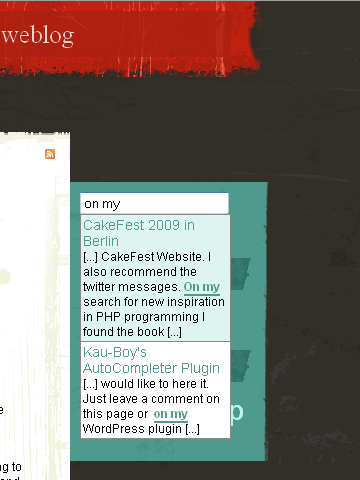
Screenshot des Plugins in einem neuen WordPress blog
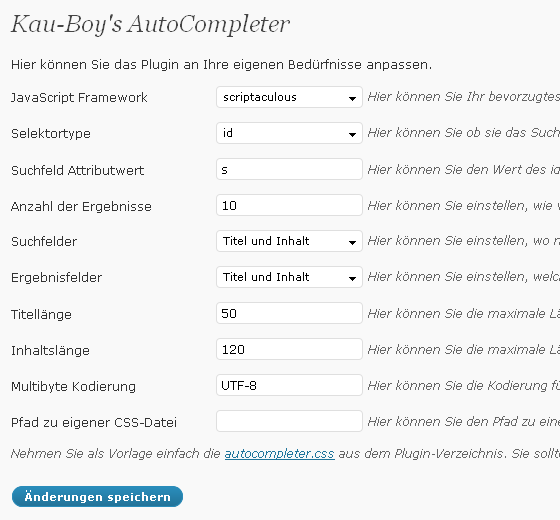
Screenshot der Einstellungsseite (auch in englisch erhältlich)
Versionsgeschichte:
- 3.1.2 Zurücksetzen der vorherigen Änderungen, da sie das Problem nicht lösen sondern es eher auslösen
- 3.1.1 Ersetzen von appendTo() mit prependTo() im jquery.autocompleter plugin zum beheben von Überlagerungs-Problemen
- 3.1 Ausblenden von PHP Warnungen, wenn WP_DEBUG inaktiv ist und Einfügen des Ergebnis-DIV in den Kopf des BODY Tag
- 3.0.4 Beheben eines Tippfehlers in der jQuery URL
- 3.0.3 Beheben eines Tippfehlers im jQuery-Selektor
- 3.0.2 Retag als 3.0.2 aufgrund eines Deploment-Fehlers im Respository
- 3.0.1 Schneller bugfix für Prototype CSS und JavaScript
- 3.0 Einsatz von AJAX, so wie es hier beschrieben wird: http://codex.wordpress.org/AJAX_in_Plugins
- 2.5 Anpassen das Plugin an WordPress Installationen, bei denen die wp-config.php eine Orderebene über dem ROOT Verzeichnis liegt.
- 2.4 Fehler mit html Entitäten im Filter beheben
- 2.3 Fehler des JavaScript in IE8 in Verbindung mit Prototype beheben
- 2.2 Deaktivieren der Suche für Suchfelder im Adminbereich und Ermöglichen der Verwendung zusammen mit dem relevanssi Plugin
- 2.1 Hinzufügen einer neuen Version von jQuery Autocomplete
- 2.0.1 Entfernen von „short open tags“, die auf blogs die Fehler verursachen die „short_open_tag“ nicht auf „On“ gesetzt haben
- 2.0 Autocompleter mit mehreren Textfelder auf einer Seite nutzbar machen, verbessern der Kürzung des Inhalt von Artikeln
- 1.9 Beheben von Problemen mit PHP4, funktioniert nun auch mit qTranslate im „Query-Modus“ (?lang=de)
- 1.8 Hinzufügen der Einstellung für die Länge des Titels und des Inhalts in den Ergebnissen
- 1.7 Erstzen von jQuery suggest durch jQuery autocomplete, da das suggest Plugin HTML Auszeichnungen zerstört
- 1.6.1 Verwendung des id Attributs als Standard anstelle des name Attributs
- 1.6 Hinzufügen der Möglichkeit das Suchfeldes anhand des name Atrrbiuts auszuwählen
- 1.5.2 Hinzufügen der richtigen Kodierung zu
html_entity_decode()um das Zerteilen von XML Enitäten zu verhindern - 1.5.1 Fehler im AJAX repsonse behoben, der die Einstellung für die Ergebnisfelder nicht geladen hat
- 1.5 Hinzufügen Auswahlmöglichkeiten für die Such- und Ergebnisfelder
- 1.4.1 Aktualisierung der Übersetzungsdatei
- 1.4 Kombinieren der Styles für jQuery und script.aculo.us, Hinzufügen einer Einstellung zur Multibyte-Kodierung
- 1.3.5 Fehler bei der
html_entity_decode()Konvertierung beseitigt - 1.3 Enfternen eines Kommentars in autocompleter.js.php, welcher eine PHP header warning erzeugt hat
- 1.2 Verwendung von
html_entity_decode()um das Zerteilen von Enitäten zu verhindern - 1.1 Entfernen von WordPress shortcodes um leere oder falsche Seiten zu verhindern
- 1.0 Möglichkeit jQuery ODER script.aculo.us zu verwenden, Übersetzen der Einstellungsseite ins Deutsche
- 0.4 Hinzufügen der Einstellung für die Anzahl der Suchergebnisse und der eigenen CSS Date
- 0.3 Hinzufügen der Einstellung für die Suchfeld ID
- 0.2 Erste stabile Version
Wenn dir dieses Plugin gefällt oder dir etwas fehlt, würde ich mich freuen es zu erfahren. Hinterlasse einfach ein Kommentar auf dieser Seiter oder auf meiner WordPress Plugin Seite.


We would like to use your plugin on a new wp-site using the latest atahualpa theme. seems not to work. any hints?
thx marc
Hi Marc,
you are just a few hours to quick. I was searching for a diffrent theme for this blog and found out, that many themes doesn’t set the id attribute for the input field. I just installed the Atahualpa 3.4.1 theme to test it. This theme also uses only the name attribute.
So after realising that many themes doesn’t have the needed id attribute I decided to add another option to be able to select the field by id or by name (or even another CSS selector).
I have to test the new option with prototype and jQuery but I am pretty sure, that I will release the new version by tomorrow (maybe today).
I hope this willl help not only you. Do you have any other ideas of how to improve the plugin?
Bernhard
Hello Bernhard
everthing works perfectly now with tha Atahualpa 3.4.1 theme!
thank you very much for the great support!
what i did:
– updated the plugin to 1.6.1.
in the plugin configuration:
– changed the selectortype to name
– changed the javascript Framework to jQuery
that’s it. now it works
I have some weird behaviour when searching for either „di“ or „no“ (without the quotes.)
It then parses the style of under wrong.
If you want to reproduce try searching for: (di)splay or no(ne)on my website.
Hi Hans,
I could reproduce the problem. I use a default jQuery plugin for the autocomplete feature. This plugin doesn’t provides the feature of an onclick handler so I have to add the link the the article in a hidden span. To make it hidden I used inline formating with display: none. But the jQuery plugin seems to destroy HTML-Markup when hightlighting the found words.
So I have to either find a new jQuery Plugin or I have to use single character markups and a diffrent CSS Layout for the results.
I think I can give you an updated version this evening which than should work with jQuery as good as with scriptaculous. Until than you might use scriptaculous to avoid this problem.
Bernhard
Hi Bernhard,
version 1.7 fixed the bug I mentioned. Thanks for the support!
In v1.8 I still get „Warning: cannot yet handle MBCS in html_entity_decode()! in /htdocs/wp-content/plugins/kau-boys-autocompleter/autocompleter_results.php on line 72“
It was working great up until v1.5 and then it has stopped. Tried uninstalling / reinstalling – any further ideas?
Hi Daniel,
I search the web for your problem and it is a bug in PHP 4 (http://bugs.php.net/bug.php?id=27626). I use html_entity_decode to convert all characters to non-entities to avoid destroying them when limiting the title/content length.
But as PHP 4 (pre 4.3.3) lacks a full support of UTF-8 it might be a prblem with the encoding. So the first thing you should try is to go to the settings page and change the multibyte encoding to ISO-8859-1.
If that doesn’t work, try to replace line 72 in autocompleter_results.php. To do so, navigate to Plugins->Installed and click edit on the plugin. From the list at the right choose the autocompleter_results.php. Then replace this line:
$str = html_entity_decode(trim($str), ENT_NOQUOTES, $encoding);
with this line:
$str = utf8_encode(html_entity_decode(trim($str)));
As I don’t have a running Server with PHP4 I can’t test it myself right now.
Bernhard
Thanks Bernhard, all is now working.
Many thanks again.
Hi and thanks for your very beautiful plugin. One only thing about styling of autocompleter.css -> ac_result class:
* add parameter left:-9999px; to disappear its border (if added) to the bottom of the page
* add !important to width
Bye!
Unfortunately it does not work while Relevanssi is activated! I’s a pitty. Bothe plugins are valuable and nice! 🙂 However, I will have to go for nice search results rather than for autocomplete…
Anyway thanks for this nice plugin!
Hi Sacha,
I checked out the relevanssi plugin and found out that this plugin sets some filters that affects other plugins for searches. I now added some code to make my plugin working with the relevanssi plugin enabled.
Hi Bernhard!
Your update just worked fine! Really smooth. Now everything seems OK. Just had to donate some money for the super quick service! 😉
Thanks and best regards Sascha
[…] sinnvoll sofort den ersten Treffer zu selektieren) ist es ein spitzen Plugin. Außerdem sollte noch der tolle Einsatz des Autoren betont werden und dessen schnelle […]
I am using your plugin, how ever there is a delay between when start typing in a result and when the results get displayed. Is there any way to change this?
If you have chosen Prototype as the framework the function is available as soon as the complete DOM is loaded if that takes some time the autocompletion is delayed. Try to switch the framework to jQuery if possible. But as the results have to be loaded with an AJAX call your server might take to long for the request.
So first try to switch the framework. If that doesn’t work out either I will check your site if there is any other function that might cause problems with my plugin.
Hi Bernhard
I like your plugin – works great. My question is – is it possible to make this search only one table in the DB? I have added a glossary of real estate terms and would like to search that and not the posts/categories/tags.
thanks,
Frank
You can change the Query inside of the autocompleter-results.php (line 30-46). But as it is a search plugin for posts and pages it is not possible to do it without changing the plugin files.
How would you like to select the table in which the plugin should search for? Manybe I’ll add that option to the plugin.
Excellent plugin but with script.aculo.us in IE8 the matching titles doesn’t show any background at all. Any idea? Thanks again for your contribution!
Juan
Thanks a lot for your comment. There seems to be a issue with IE8 and the Element() function of prototype. The class name was not added to the element and so the CSS had no effekt in IE8. I fixed that and added the class with the addClassName() function after creating the element. It should now also work in IE8. Just update the plugin to version 2.3 and it should work in IE8 with prototype.
Hey Bernhard!! Thanks a lot for your quick reply. You worth a donation!! 😉
One more request, please remove my last comment, I entered my email address in the name box by mistake.
Thanks a lot again!!!
No problem. And as I have to accept every comment for new commenters (new name or email address) your comment was only visible for you but for nobody else. I’m glad I could have helped you. I am always happy to getting some feedback, even if they tell me about some bugs I haven’t found, yet. And many thanks for the donation. You are the second who donated to one of my plugins.
hi
how to add taxonomies in result search?
thank you
I am not quite sure what you want to do? Do you want to have a search for taxonomies or do you want to add the taxonomies to the list of results. That might be a little much of data. Or do you want only the title and the taxonomies as a result. I may include a option to display taxonomies in the results.
Is there a way to set the search to accept multiple keywords.
For example if the user types „cool post“
Can this plugin search the database to find a post that has both the keywords „cool“ and „post“ at the same time.
I was fooling around with it and used:
explode(“ „,$words);
– to get the each word the user enters (separated by spaces)
After that I’m a bit confused where to go.
After that I’m stuck.
What you can do is replace the line 28 in the file autocompleter_results.php with this line:
This will first split the searcg string on every space and then combines it again with a percentage sign, which is in the MySQL database used as a wildcard.
If you have further questions just ask again.
Umlaute: Anscheinend funktioniert es nicht mit Umlauten.
Wenn man bei deiner Suche „TomTom, m“ eingibt wird „TomTom, möge die Macht mit dir sein!“ vorgeschlagen. Wenn man nun ein „ö“ hinzufügt („TomTom, mö“) wird nichts mehr vorgeschlagen…
Hallo David,
vielen Dank für deinen Hinweis. Ich hab den Fehler gefunden und behoben. WordPress hat anscheinend die HTML Entitäten nach dem Laden aus der Datenbank umgewandelt. Dadurch hat der Filter nicht mehr funktioniert.
Aktualisiere bitte das Plugin auf Version 2.4 und teste es noch einmal. Vielen Dank noch einmal für den Hinweis.
Hallo Bernhard!
Das ist ja ein Service.
Ich habe das Plugin aktualisiert und jetzt funktioniert es einwandfrei!
Danke
Hi Bernhard!! I’ve been trying to install this plugin in a new theme Mystique (http://wp.digitalnature.eu/mystique/) but it doesn’t work. I tried everthing, removed every single plugin installed and nothing.
Any idea what can be done in order to make it work, I love it and that’s exactly what I need for my blog.
Thanks in advance,
Juan
Hi Juan,
I just installed a copy of the mystique theme in my local test blog. I couldn’t find any issue with the plugin. The problem might be the ID for the search field mystique uses. The default is „s“ but on mystique it is „searchfield“. So please go to the config page of my plugin („AutoCompleter“ in the „Settings“ section) and change the „Selectortype“ to „name“ and the „Search field attribute value“ to „s“ if you want to enable the plugin on all search fields.
If that even doesn’t fix it, you might provide me a link to the blog you are trying to use it on so I can debug it.
Bernhard
Thanks Bernhard! My test blog is http://70.87.15.196/~beneficu/blog/
Good luck and thanks a lot for your help!!!
Juan
It works now!!! I just placed the jquery call on top of the header. Thanks a lot for your great support!!
You have been to fast. I just found the reason of the issue. You have included jQuery twice in your blog (or any plugin was doing it). When a plugin developer does not use the auto-inclusion that will result in overwriting jQuery. And as I extended jQuery with the autocompleter plugin before, this plugin was no longer available.
You still have jQuery included twice but the one inside of your WordPress directory is missing. You should fix that, even if you want to use the Google Ajax Libs.
Hi, thank you for the great plugin. It is working flawlessly on my blog. However, I’d like to ask about security of this plugin. Is it scripted to prevent potential SQL injections?
Thanks.
As I use the WordPress class WP_Query() to query the results, the string should be correctly escaped by the WordPress system.
Thank you for the reply. I appreciate the assurance.
Hi. Thank you for the plugin. I have an error: require_once(../../../wp-config.php) [function.require-once]: failed to open stream: No such file or directory in /home/…/public_html/wp-content/plugins/kau-boys-autocompleter/autocompleter.js.php on line 3
My wp-config.php is in the root directory and perhaps that’s the problem. How can I fix it?
Thank’s in advance.
Hi Stefan,
usually the wp-config.php should be in the root directory of your blog. Which is your root? It should be
/home/.../public_htmlin your case. Maybe it’s some kind of rights that block the script from being included. As a quick fix you might try to use a absoulte path for therequire_once()function.Hi Bernhard. My wp-config.php file is in the directory before „public_html“ Moved for security reasons.
Could you tell me what exactly I have to change on line 3 in autocompleter.js.php file?
P.S. When I move wp-config.php in public_html folder plugin works fine. As I see the problem is the location of my wp-config.php file.
Hi Stefan,
I don’t know why you moved the wp-config.php to protect it (and how your WP installation still works), but usually you can protect the file by adding these lines to the
.htaccessfile:But if you still want to keep your
wp-config.phpout of yourpublic_htmlfolder, just change the path to it, in my script. On line 3 you can use an absolute path or you simply add another../in front of the relative path, to move one directory up.It’s ok now.
BTW, the best way for me to secure wp-config.php file is to store it outside the web-root folder as you can see at http://codex.wordpress.org/Hardening_WordPress under „Securing wp-config.php“
Best regards.
Wow, I just found the answer on how your blog is still running with the wp-config not in the root directory on this page: http://codex.wordpress.org/Hardening_WordPress#Securing_wp-config.php
There are always things you don’t know about WordPress that are just cool. So thanks for sharing this information with us!
Hallo Bernhard
Ich liebe dieses Plugin. Einfach genial! Es macht die WordPress-Suche um ein x-faches besser! Danke dafür!
Leider habe ich ein Problem seit ich eine Slideshow direkt in mein Template eingebaut habe, für welche ich jquery verlinken muss. Sobald ich die externe jquery-Verlinkung entferne funktioniert der Autocompleter wieder.
Ich habe folgende jquery-Verlinkung verwendet:
Hast du eine Idee wie ich das hinbekomme kann. Folgenden Slider hab ich eingebaut: http://designm.ag/tutorials/image-rotator-css-jquery/
Gruss
Sandro
Hallo Sandro,
leider fehlt dein Bespiel der jQuery-Verlinkung. Falls du dort HTML einfügen wolltest, dann füge es in einem neuen Kommentar nochmals ein und umschließe es mit [code] … (deine Code) … [/code]. Damit wird es dann nicht durch die Kommentarfunktion gelöscht.
Im Grunde musst du aber jQuery nicht für jede Funktion neu Verlinken. Ich habe in meinem Plugin die Funktion
wp_enqueue_script()verwendet, die dafür sorgt, dass jQuery geladen wird, falls es noch nicht von einer anderen Funktion geladen wurde. Falls du es also noch einmal manuell lädst, kann das zu Problemen führen.Eine Möglichkeit wäre es noch, mein Plugin auf Prototype umzustellen, aber dann lädst du immer zwei Bibliotheken, was im Grunde nicht notwendig ist.
Hey Danke für die rasante Antwort!
Hm… das Problem ist, wenn ich es nicht manuell nochmals lade, dann funktioniert der Slider nicht. Hier mein Slider-Script:
<script type="text/javascript" src="http://ajax.googleapis.com/ajax/libs/jquery/1.4.2/jquery.min.js"></script> <script type="text/javascript"> $(document).ready(function() { //Show Banner $(".main_image .desc").show(); //Show Banner $(".main_image .block").animate({ opacity: 0.85 }, 1 ); //Set Opacity //Click and Hover events for thumbnail list $(".image_thumb ul li:first").addClass('active'); $(".image_thumb ul li").click(function(){ //Set Variables var imgAlt = $(this).find('img').attr("alt"); //Get Alt Tag of Image var imgTitle = $(this).find('a').attr("href"); //Get Main Image URL var imgDesc = $(this).find('.block').html(); //Get HTML of block var imgDescHeight = $(".main_image").find('.block').height(); //Calculate height of block if ($(this).is(".active")) { //If it's already active, then... return false; // Don't click through } else { //Animate the Teaser $(".main_image .block").animate({ opacity: 0, marginBottom: -imgDescHeight }, 250 , function() { $(".main_image .block").html(imgDesc).animate({ opacity: 0.85, marginBottom: "0" }, 250 ); $(".main_image img").attr({ src: imgTitle , alt: imgAlt}); }); } $(".image_thumb ul li").removeClass('active'); //Remove class of 'active' on all lists $(this).addClass('active'); //add class of 'active' on this list only return false; }) .hover(function(){ $(this).addClass('hover'); }, function() { $(this).removeClass('hover'); }); //Toggle Teaser $("a.collapse").click(function(){ $(".main_image .block").slideToggle(); $("a.collapse").toggleClass("show"); }); });//Close Function </script>Ok, ich habe eine Vermutung: Es könnte sein, dass das jQuery bei dir nicht in HEAD eingebunden wird, sondern erst kurz vor dem schließenden BODY Tag. Da du aber im bereits zuvor die Funktion
$(document).ready()verwenden möchtest, schlägt es fehl. Eine andere Mögichkeit wäre es, dass WordPress immerjQuery()statt$()verwendet, da es sich sonst mit anderen Bibliotheken (vor allem Prototype, dass auch eine$()Funktion hat) in die Quere kommt. Versucht mal in deinem Code einfach immer$(...)mitjQuery(...)zu ersetzen. Das solltest du immer tun oder aber deinen Code mit einer anonymen Funktion umschließen. Näheres dazu findest du hier: http://api.jquery.com/jQuery.noConflict/#example-1Gibt es zu dem Blog, auf dem du mein Plugin verwendest auch eine URL? Vielleicht kann ich es mir dann mal live ansehen und den Fehler ausmachen.
Hammermässig! Ich habe wie von die empfohlen in meinem Script alle $(…) mit jQuery(…) ersetzt und es klappt. Grandios! Sobald ich den Blog live schalte werde ich mich wieder bei dir melden! Vielen Dank für die so schnelle und kompetente Hilfe!
Gruss
Sandro
Schön, dass ich helfen konnte. Die meisten jQuery Entwickler benutzen die Varainte, die ich in dem Link aufgezeigt habe. Damit können sie weiterhin die kurze $() Funktion verwenden und trotzdem kompatibel zu anderen Bibliotheken bleiben.
Hi Bernhard,
Thanks for this great plugin.
I’ve set it up to show only the page titles.
Is it possible to filter out specific pages or to show only the children of a page?
Grtz
Ardy
Hi Ardy,
as it uses the default WordPress functions to search for posts (WP_Query), you might use filters in the functions.php of your theme to add additional filters for the search. Here you will find some examples on how to change the queries: http://codex.wordpress.org/Custom_Queries
You most probably have to use „add_filter“ on „posts_where“ like in one of the examples. You can than include or exclude pages/posts or add additional filters.
Thank you Bernhard,
I figured it out, and exluded the pages I don’t want to show up in the search. this is the code I used.
function searchExcludePosts($query) {
  if ($query->is_search) {
    $query->set('post_type', 'page');
    $query->set('post__not_in', array(2,5,7));
  }
  return $query;
}
add_filter('pre_get_posts','searchExcludePosts');
grtz
Ardy
Glad I could help you. And I haven’t seen the „pre_get_posts“ filter before. But it looks quite useful. Thanks for posting your solution!
Is there a way to hide certain posts/pages from autocompleter? Would be great to have an option to hide by post/page ID
Just check out the solution that worked for Ardy. You can change the query through the WordPress functions. So thee might be a plugin to hide pages from searches in general. This would also hide it in my plugin. I might implement an option to hide specific posts/pages/categories in a new version. But I think that there are many plugins to solve exactly this task. Or you use the filters as mentioned before.
hi,
i like very much your plugin but i have a problem, when i try to search something the autocomplete list remain behind the head image and the menu bar too. the theme is twenty eleven.
thanks in advance
bonz
Hi bonz,
fixing that problem is very wasy. As every blog has a different layout, I offered an easy way to change the layout of the plugin. Just copy the autocomplete.css file (which you can find at the settings page) You also have to set up the new location on the settings page. There you can adjust the z-index for the results. I already set it to 100 but that might not be enough for your theme. You’ll find the value on line 11:
.ac_results {
	...
	z-index: 100;
}
Increasing that value should resolve the problem. If not, please provide me a link to the blog where it happens and tell me in which browser it happens.
Bernhard
hi,
nothing to do. i tried to increase the value but nothing, the problem now is a list full of warning and i’ve deleted the custom patch to return like the start point but always the list full of warning. i’ve deleted the plugin and download it again, nothing to do. if you want see what happens, here my site http://www.blitzband.com/
i use safari and i tested with firefox and chrome too, same problem
i’m very sorry to disturb to you again
bonz
hi,
here again. i’ve tested your plugin on my computer with mamp in localhost and i don’t get any warning the autosuggest is ok (maybe it’s a server problem). remain always the problem of my first post, i’ve increased the default value but nothing to do, always the same.
thanks again for your patience 🙂
bonz
Hi Bonz,
I don’t know why your server prints warnings, even if WP_DEBUG is not enabled, but I think I have fixed that issue now.
The other problem is curios. It looks like some browsers are not able to handle the z-index value correctly if another element has a gradient on the background, as your header image and navigation has. As the jQuery plugin I use includes the DIV for the results to the bottom of the BODY tag, this was causing the issue. I know changed the source code of the jQuery plugin so it will prepent it right after the opening BODY tag. This should fix your issue.
I already commited a new version of the plugin. Just update to version 3.1.1 and try again.
Bernhard
hi,
i’ve updated and now it works fine, remain only the first problem.
I have modified the position of the box to right and now for me it’s ok . take a look please
thank you very, very much for you time.
I will make a donation for your precious job
bonz 🙂
OK, now I found the real issue. The twentyeleven theme set the z-index of the HEADER tag with the id „branding“ to 9999! Unbelievable! So the fix is quite easy. Just add this to the autocomplete.css file (or change the z-index where it is defined first):
.ac_results {
	z-index: 10000;
}
I hope this will finally fix the issue. You sould than be able to view the results just under the input and not on the right.
ok. now it’s really ok. i’m very happy 🙂
i have just made a donation for your work, it is not a lot but in this moment it’s what I can.
thanks again for your time
bonz
Thank you! I am always happy if someone gives me a feedback about a bug (even if it’s not my fault). That’s better than just uninstalling the plugin and rating it bad. As a plugin developer you can’t test every possible WordPress setup and combination of plugins and as you can see, looking at the previous comments, there are many possible issues combining my plugin with other plugins or themes.
So thanks for your feedback! I hope that your visitors will enjoy the new feature.
hi,
here again.
how i can do to remove the auto orange selection from the list leaving it blank.
sometimes i need search something without autocomplete.
thanx for the answer
bonz
Hi,
changing the background color ist simple. Just change it in your cutsom CSS file:
.ac_over,
.ac_results li.selected {
	color: #fff;
	background-color: #f93;
}
You can either change the background-color or simply remove it, so a selected entry looks like all the other entries.
But what do you mean with „sometimes i need search something without autocomplete“? Where do you have the autocomplete where you don’t want it?
hi,
i don’t speak very well english but i’ll try to explain me.
i don’t want to change the color the color it’s ok.
when i search something with few letters like „boc“ (i mean bocelli)
the autocomplete in automatic select the first entry of the list and when i hit enter appears only the content of the first entry. i would like to see every songs of bocelli not only the content of the entries.
in few words it’s possible to disable the autoselect of the autocomplete, eventually i choose alone the entry.
i hope that you understand what i mean.
thanx again
bonz
Ah now I know what you mean. I think it is possible with the Prototype version but I am not sure about the jQuery version. Give me till tomorrow to find it out and to provide an option in the backend to enable this.
Hi! bin total von dem Plugin begeistert!
Kleines Problem: ich lese hier, dass Relevanssi unterstützt wird, kann aber mit den aktuellen Versionen keine gemeinsame Funktion hinkriegen – Autocomplete scheint immer die eigene Suchfunktion zu verwenden und nicht auf die Relevanssi-Ergebnisse zurückzugreifen…
Haben sich die beiden Plugins wieder auseinanderentwickelt? 😉
Hallo Martin,
die Unterstüzung für Relevanssi bezog sich bisher darauf, dass die Filter von Relevanssi entfernt wurden, damit das Plugin überhaupt damit funktioniert. Da es sich aber seitdem sehr weiterentwickelt hat, kann es gut sein, dass die Filter nun entfernt werden können und es trotzdem noch funktioniert.
Da ich Relevanssi noch nie selbst verwendet habe weiß ich aber nicht, wie das gewünschte Ergebnis aussehen würde. Die Filter werden in der Datei autocompleter_results.php in den Zeilen 12-14 entfernt. Es wäre toll, wenn du diese Zeilen bei dir mal auskommentieren könntest um zu testen, ob es noch funktioniert. Wenn ja dann werde ich natürlich gerne die Filter von Relevanssi so belassen wie sie sind.
Falls du keine Programmierkenntnisse besitzt oder dich nicht ran traust, dann sag mir doch einfach mal, wie du Relevanssi eingestellt hast und ich versuche das bei mir in einer lokalen Version mal zu testen.
Gruß
Bernhard
Bernhard, danke für die Antwort!
Auskommentieren der Zeilen verändert zwar etwas (z.B. zeigt die Ergebnisliste anfangs kurze Worte aus dem Relevanssi-Index an), aber weder scheint die Gewichtung übernommen zu werden, noch tauchen z.B. Ergebnisse aus Custom Post Types oder Custom Taxonomies aus, die bei einer direkten Relevanssi-Suche erscheinen, und zwar oben, wo ich sie hingewichtet hatte… 😉
Brich Dir keinen ab – eine Live-Suche wäre zwar nett gewesen, aber da scheint es im Zusammenspiel doch ein paar Probleme zu geben, selbst das vom Relevanssi-Entwickler empfohlene ThreeWP-Ajax-Such-Dingens funktioniert allenfalls mit TwentyTen-Standard-Them… aber für meine Zwecke tut es Relevanssi allein im Prinzip auch. 🙂
Hab jedenfalls Dank und den Autocompleter bring ich garantiert auf einer meiner anderen Seiten unter 😉
ciao
Martin
hi,
for sometime I have not used yours plugin because there was a compatibility problem with the new version of the plugin search everything, but now I have reinstalled the old version. now it’s ok. the problem now is with the chrome browser, i’m on mac, I have tried to increase the z-index but nothing to do, the result of the search is always behind the flashplayer.
thanx
bonz
Hi Bonz,
that particular problem comes from the flash player plugin. The flash player does not care about z-index by default. Even if you set it to 0 for the flash and a high value for the other elements. But there is a very easy solution to fix it. It is explained in detail on this page: http://slightlymore.co.uk/flash-and-the-z-index-problem-solved/.
I hope that you can add the parameters to the flash content and make it work together with my plugin again.
hi,
thank you for the answer
the problem is only with chrome. on safari and firefox no problem.
i tried to change some parameters in flashplayer, nothing to do.
maybe on chrome for windows the problem don’t exist.
ciao
bonz
Hi there!
I’m using your plugin but I’d like to make a simple change.
If i don’t find any results after entering the keywords, i want to show a message in results field saying something like: No results… try a different phrasing or ask an agent.
Ask an Agent by:Email (and the mailto link)
Is this possible? How can i do it?
Thx in advance,
JF
Hi Joao,
that is absolutely possible. The easiest way would be, to change the output in the file autocomplete_results.php arround line 69. There the results array will be printed:
You might easily check, if the results array is empty, and in this case add an entry, you want to show like the following:
if(empty($results)){
	$results[] = array(
		'url' => 'mailto:me@example.com',
		'title' => 'No results... try a different phrasing or ask an agent.',
		'content' => 'Ask an Agent by: me@example.com'
	);
}
printResults($results, $framework);
This will give you one entry wil your link to open an email.
I hope that was, what you wanted to have.
Yes that’s it! 😀
It worked perfectly!
Thank u very much!
JF